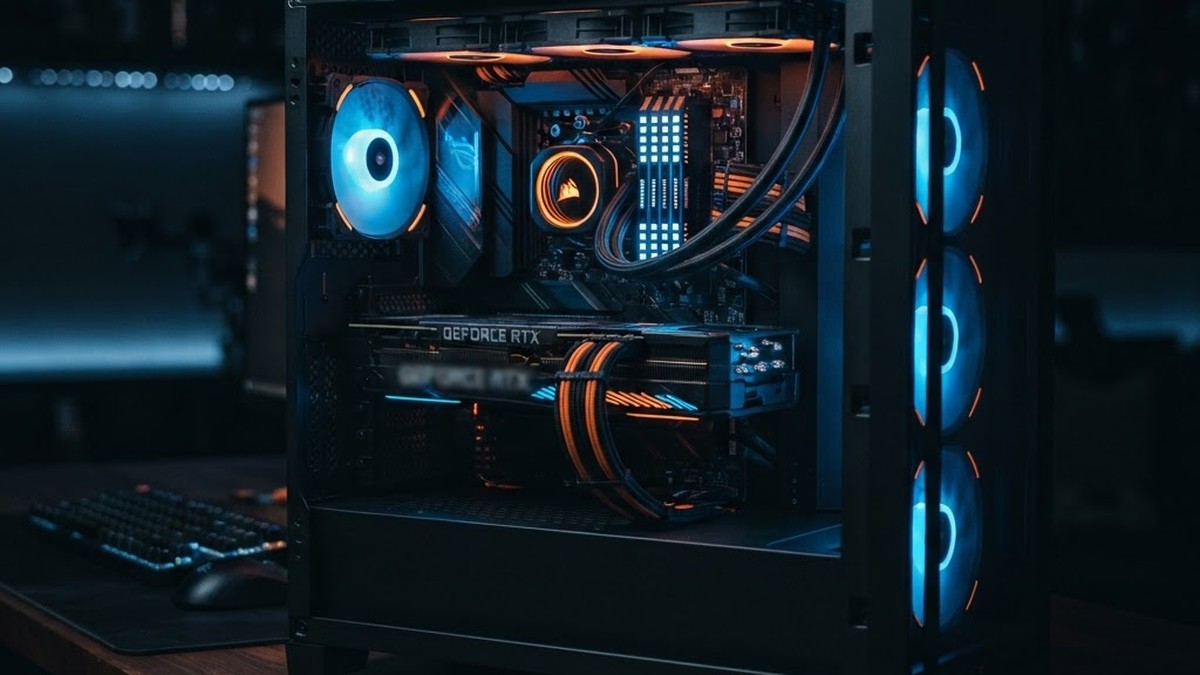
Gaming PC Tower Build Guide 2026: GPU and RAM Prices Explained
DDR5 memory has quadrupled in price. GPUs are getting scarcer. AI datacenters are eating the supply chain. If you are building or buying a desktop gaming PC in 2026, the old advice does not work anymore. Here is what to do instead.
Table of Contents
The 2026 Component Price Crisis
If you have priced a gaming PC build recently, you already know the numbers do not make sense anymore. A 32GB DDR5-6000 kit that cost around $72 USD in early 2025 was going for $404 USD by August 2026. That is roughly a 460% increase. The same RAM kit that used to be a rounding error in your build budget is now more expensive than a mid-range CPU.
GPUs are heading the same direction. NVIDIA's RTX 50-series launched at higher MSRPs than the 40-series, and retail prices frequently run 15-30% above MSRP as supply tightens. The problem is the same across both components: AI datacenter demand is consuming fabrication capacity faster than it can expand.
The RAM Problem in Detail
The DDR5 price explosion is not a temporary supply chain glitch — it is a structural shift. Memory manufacturers Samsung, SK Hynix, and Micron have allocated the vast majority of their 2026 production capacity to AI datacenter customers. These contracts pay more per unit than consumer RAM, so manufacturers prioritize them. According to Tom's Hardware's August 2026 price tracking, a 32GB DDR5-6000 CL30 kit sits at $404, a 64GB kit at $869, and a 96GB kit at $1,849.
One Reddit commenter on r/buildapc summarized it bluntly: "All of 2026's production is accounted for, most of it bought by AI datacenters. 2027 is being bid out." Retail RAM is essentially leftover capacity, priced accordingly.
The practical impact on a desktop build: a gaming PC that would have cost $1,200 in 2024 now costs $1,600-1,800 with the exact same GPU and CPU, purely because of RAM. Some pre-built vendors have started selling systems without RAM, letting buyers source their own.
Desktop GPU Landscape in 2026
Desktop GPU pricing has not quadrupled like RAM, but the trend is concerning. Here is where the main options stand as of August 2026.
| Desktop GPU | VRAM | MSRP (USD) | Target Resolution | Availability |
|---|---|---|---|---|
| Intel Arc B570 | 10GB | $219 | 1080p high | Good |
| Intel Arc B580 | 12GB | $249 | 1080p ultra / 1440p high | Good |
| RTX 3050 (desktop) | 8GB | $249 | 1080p medium | Widely available |
| RTX 4060 (desktop) | 8GB | $299 | 1080p ultra / 1440p high | Good |
| Intel Arc A770 (16GB) | 16GB | $349 | 1080p ultra / 1440p high | Limited (clearance) |
| RTX 4070 (desktop) | 12GB | $549 | 1440p ultra | Good |
| RTX 5060 (desktop) | 8GB | $299 | 1080p ultra / 1440p high | Spotty, above MSRP |
| RX 9070 XT (desktop) | 16GB | $599 | 1440p ultra / 4K medium | Inconsistent |
RTX 4060 Desktop — The Value Pick
The RTX 4060 desktop card at $299 MSRP is the best value GPU for 1080p gaming. It has 8GB VRAM, DLSS 3 frame generation, and handles every current game at 1080p ultra settings. For 1440p, it works at medium-high settings with DLSS enabled. The main limitation is the 8GB VRAM, which may require texture reductions in 2027+ titles, but at $299 it is hard to beat.
RTX 5060 Desktop — Newer But Harder to Find
The RTX 5060 desktop card also launched at $299 MSRP but uses GDDR7 memory and NVIDIA's Blackwell architecture. It is about 20-30% faster than the 4060 and supports DLSS 4. The problem is availability — street prices frequently run $350-400, and stock is inconsistent. If you can find one at MSRP, it is the better buy. If not, the 4060 at $299 is the safer choice.
AMD RX 9070 XT — The 1440p Alternative
AMD's RX 9070 XT has 16GB VRAM and targets 1440p ultra gaming. It has shown lower price inflation than equivalent NVIDIA cards through 2026, making it a strong value alternative. Availability is the main issue — AMD's production volume is lower, so finding one at MSRP requires patience. If you can get one, the 16GB VRAM makes it more future-proof than any 8GB NVIDIA card at a similar price.
Intel Arc B580 — The Sleeper Pick
Intel's Arc B580 launched in January 2025 at $249 USD, and it has quietly become one of the best value desktop GPUs on the market. It has 12GB of GDDR6 VRAM on a 192-bit bus — 50% more VRAM than the RTX 4060 at the same price. According to Gamer's Nexus and TechSpot benchmarks, the B580 beats the RTX 4060 by 7% at 1080p and 18% at 1440p in rasterized performance. It also has 50% more memory bandwidth (456 GB/s vs 272 GB/s).
The trade-offs: Intel's Arc drivers have historically been less polished than NVIDIA's, with occasional issues in older or niche games. Ray tracing performance is behind NVIDIA's RTX 4060 despite the extra VRAM. XeSS upscaling (Intel's DLSS equivalent) is good but not as widely supported as DLSS 3 — about 100+ games support XeSS vs 500+ for DLSS 3.
For a budget build in 2026, the B580 is hard to ignore. You get 12GB VRAM for $249, which means this card will age better than any 8GB NVIDIA card at the same price. If you mostly play modern AAA titles and do not care about ray tracing, the B580 is arguably the best value desktop GPU you can buy right now.
I run an Arc B580 in my own desktop, and it has been a genuinely pleasant surprise. The 12GB VRAM means I never have to think about texture settings at 1080p, and the raster performance holds up well in everything I have thrown at it. The driver concerns that haunted the older A770 are largely resolved with Battlemage — I have not hit any showstopping bugs in regular use. The one thing I do notice is that XeSS upscaling is not available in every game, so you do not get the same frame-rate boost DLSS 3 provides on NVIDIA cards. But for raw performance per dollar, the B580 is hard to beat.
Intel Arc B570 — The Budget Champion
The Arc B570 launched alongside the B580 at $219 USD with 10GB GDDR6 VRAM on a 160-bit bus. Ars Technica called it "the cheapest good graphics card" at launch. It targets 1080p high settings and competes directly with the RTX 3050 — but with 2GB more VRAM and significantly better raster performance at a lower price.
The B570 is the card to buy if your budget is under $250. It outperforms the RTX 3050 in virtually every benchmark while costing $30 less. The 10GB VRAM means you will not be turning down textures in current games, and the card will remain viable longer than any 8GB option at this price.
Intel Arc A770 (16GB) — The Clearance Wildcard
The older Arc A770 (Alchemist architecture, 2022) launched at $349 for the 16GB model. It has since been discounted to clear inventory — you can find it for around $209-230 USD on clearance and used markets. With 16GB of VRAM and a 256-bit bus, it offers more memory than any NVIDIA card under $500. Performance is roughly RTX 3060 / RTX 4060 level in raster, with weaker ray tracing and older drivers than the B580.
If you can find a new A770 16GB on clearance under $250, it is a strong value pick for VRAM-hungry games and content creation. But the B580 is the better card overall — newer architecture, better drivers, lower power consumption (190W vs 225W), and similar street price.
RTX 3050 Desktop — Avoid
The desktop RTX 3050 has 8GB VRAM (more than the laptop version) but uses older Ampere architecture with very few CUDA cores. It is significantly slower than the 4060 for the same VRAM. At $249, it looks cheap, but the performance per dollar is terrible. Save the extra $50 and get a 4060.
Build vs Pre-Built: The Math Has Flipped
For years, building your own PC was 10-20% cheaper than buying a pre-built with equivalent specs. You got better component selection, no bloatware, and upgradeability. That advice made sense when RAM was cheap and GPUs were available at MSRP. In 2026, the math has flipped.
Why Pre-Built Can Be Cheaper Now
Major system builders — CyberPower, iBUYPOWER, HP Omen, ASUS ROG — purchase components under bulk contracts signed 6-12 months in advance. That means they are paying 2025 prices for RAM and GPUs in their 2026 systems. A pre-built gaming PC with 32GB DDR5 and an RTX 4060 might cost $1,400 today, while buying those same components individually at retail could cost $1,600+ because you pay current spot prices.
The pre-built also includes a system warranty covering everything, not just individual parts. It comes assembled, tested, with Windows included. When RAM alone can run $400, those bundled extras start looking like genuine savings.
When Building Still Makes Sense
Building your own is still the better choice in specific scenarios:
1. You already own components. If you are upgrading an existing build and just need a new GPU or more RAM, you are only paying for those specific parts. A full pre-built wastes your existing case, PSU, and storage.
2. You want specific component choices. Pre-builts often use proprietary motherboards, mediocre power supplies, and basic coolers. If you care about upgradeability, a quality PSU, or a specific motherboard, building is the way.
3. You want to spread out purchases. Buy a CPU now, a case next month, wait for a GPU sale. Pre-builts require paying for everything at once.
4. You can find bundle deals. Micro Center and Canada Computers often discount CPU+motherboard+RAM bundles enough to offset the RAM tax. A bundle can bring the effective RAM price down 20-30% versus buying individually.
| Factor | Build Your Own | Pre-Built |
|---|---|---|
| Component cost (current retail) | Higher (spot pricing) | Lower (bulk contracts) |
| Assembly and testing | Your responsibility | Included |
| System warranty | Per-component only | Full system coverage |
| Component quality | Your choice (upgradeable) | Often proprietary/basic |
| Windows license | $100-140 extra | Included |
| Upgradeability | Excellent | Limited (proprietary parts) |
| PSU quality | Your choice (buy good one) | Usually cheapest option |
How Much RAM and VRAM You Need
With RAM prices so high, buying more than you need is an expensive mistake. But buying too little means stuttering, crashes, and a system that feels old within a year.
System RAM
| Use Case | Minimum | Recommended | Notes |
|---|---|---|---|
| Esports and older games | 16GB | 16GB | CS2, Valorant, Rocket League run fine |
| Modern AAA gaming | 16GB | 32GB | Cyberpunk, Starfield, upcoming 2027 titles |
| Gaming + Discord + browser | 16GB | 32GB | Background apps eat 4-6GB alone |
| Gaming + streaming | 32GB | 32GB | OBS + game + chat needs headroom |
| Gaming + content creation | 32GB | 64GB | Video editing, 3D rendering, AI tools |
16GB is the floor in 2026, not the recommendation. Modern games can use 12-14GB of system RAM alone. Add Discord, a browser, and Windows overhead, and you are over 16GB. 32GB gives you breathing room for the current console generation. But at $400+ for a 32GB kit, 16GB might be the practical choice right now. The compromise: buy 2x8GB now (about $200), and add another 2x8GB when prices drop. Just make sure your motherboard has 4 RAM slots.
GPU VRAM
| VRAM | What It Handles | Verdict for 2026 |
|---|---|---|
| 4GB | Low settings, older games | Insufficient — do not buy |
| 6GB | 1080p medium-high, some 1440p with DLSS | Bare minimum |
| 8GB | 1080p ultra, 1440p high, some 4K with DLSS | Sweet spot |
| 12GB+ | 1440p ultra, 4K high, ray tracing at 1440p | Future-proof but expensive |
8GB VRAM is the target for desktop GPUs in 2026. The RTX 4060, 5060, and 4070 all offer this or more. 8GB handles 1080p ultra and 1440p high in virtually every current game. 12GB+ (RTX 4070 or RX 9070 XT) is ideal if you play at 1440p ultra or want ray tracing at higher resolutions, but it puts you into a higher price bracket.
CPU Pairing Guide
The CPU matters less than the GPU for gaming, but pairing a budget CPU with a mid-range GPU can bottleneck performance. In 2026, here is what to look for:
Minimum: 6 Cores, 12 Threads
An Intel Core i5-13400F or AMD Ryzen 5 7600 handles any current GPU up to an RTX 4060 without bottlenecking. These CPUs cost $180-220 and deliver excellent gaming performance. Do not overspend on a CPU if your GPU is a 4060 or below.
Recommended: 8 Cores, 16 Threads
An Intel Core i5-14600K or AMD Ryzen 7 7700X gives you headroom for streaming, multitasking, and a future GPU upgrade. These cost $280-320. If you plan to stream, edit video, or run multiple apps while gaming, the extra cores matter.
Overkill: 12+ Cores
Ryzen 9 7900X or Core i7-14700K (12+ cores) only makes sense if you do heavy productivity work alongside gaming. For pure gaming, a 6-core or 8-core CPU is all you need. Save the money and put it toward a better GPU or more RAM.
| CPU | Cores/Threads | Price (Aug 2026) | Best GPU Pairing |
|---|---|---|---|
| Ryzen 5 7600 | 6/12 | ~$200 | Up to RTX 4060/5060 |
| Core i5-13400F | 6/12 (10 hybrid) | ~$180 | Up to RTX 4060 |
| Ryzen 7 7700X | 8/16 | ~$290 | Up to RTX 4070/9070 XT |
| Core i5-14600K | 14 (6P+8E)/20 | ~$310 | Up to RTX 4070/9070 XT |
Three Build Paths at Three Budgets
Budget Path: Under $900
At this price, building does not make sense — buy a pre-built or a refurbished system. A pre-built with a Ryzen 5, RTX 4060, and 16GB RAM can be found for $800-900. You cannot beat that price building from scratch with current RAM costs. If you insist on building, look for used GPU deals and bundle CPU+motherboard+RAM at Micro Center or Canada Computers.
Mid-Range Path: $1,000-1,500
This is where building and pre-built are roughly equal in cost. A build with a Ryzen 5 7600, RTX 4060, 16GB DDR5, 1TB NVMe, and a decent B650 motherboard costs about $1,100-1,300 in parts. A comparable pre-built runs $1,000-1,200. The pre-built saves you assembly time and includes a warranty, but you get better component quality building your own. If you buy a pre-built, immediately swap the PSU for a good 650W Gold unit ($80) — the one thing pre-builts always cheap out on.
Enthusiast Path: $1,500-2,500
At this budget, building becomes clearly cheaper again because pre-builts overcharge for higher-end GPUs. A custom build with a Ryzen 7 7700X, RTX 4070 (12GB), 32GB DDR5, 2TB NVMe, and a quality 750W Gold PSU costs about $1,600-1,800. A comparable pre-built runs $1,900-2,200. The RX 9070 XT (16GB VRAM) is an excellent alternative to the RTX 4070 if you can find one in stock — more VRAM for similar money.
CPU: Ryzen 5 7600 ($200) | GPU: RTX 4060 ($299) | RAM: 2x8GB DDR5-6000 ($200, upgrade later) | Motherboard: B650 ($130) | Storage: 1TB NVMe Gen4 ($70) | PSU: 650W Gold ($80) | Case: Any mesh-front ($60) | Total: ~$1,039 in parts. Or buy a pre-built with the same specs for $1,000-1,200 and skip the assembly.
When Will Prices Drop?
The honest answer: not soon. All of 2026's memory production capacity is already allocated, mostly to AI datacenters. Samsung and SK Hynix are expanding fabrication, but new capacity will not come online until late 2026 or early 2027. Some analysts expect modest RAM price relief in Q1 2027, but AI demand will continue competing with consumer supply for the foreseeable future.
GPU pricing depends on memory availability for card manufacturing. If GPU manufacturers cannot get affordable GDDR6/GDDR7 for their cards, they will either raise prices or reduce production. Industry analysts are warning that the memory shortage could trigger a full-blown GPU famine.
Should you wait? If you need a PC now, buy a pre-built to lock in pre-spike component pricing. If you can wait until early 2027, you may see better component pricing — but waiting carries risk. Prices could stay flat or rise further before they drop.
Related Articles
Gaming Laptop GPU Guide 2026: Best Bang for Buck at $1000 How Much Storage Does Video Editing Really Need in 2026? How Much Laptop AI Performance Do You Actually Need? Best Budget Gaming Accessories Under $50Frequently Asked Questions
Sources: Tom's Hardware RAM price tracking (August 2026), TechPowerUp memory price analysis, NVIDIA RTX 5060/4060 specifications, PassMark GPU benchmarks, UserBenchmark, IDC PC price forecast, Reddit r/buildapc community data. Prices verified August 28-29, 2026.
Information checked August 29, 2026. Prices in USD. Confirm current pricing with retailers before purchasing.